 Nask AI
Key takeaways
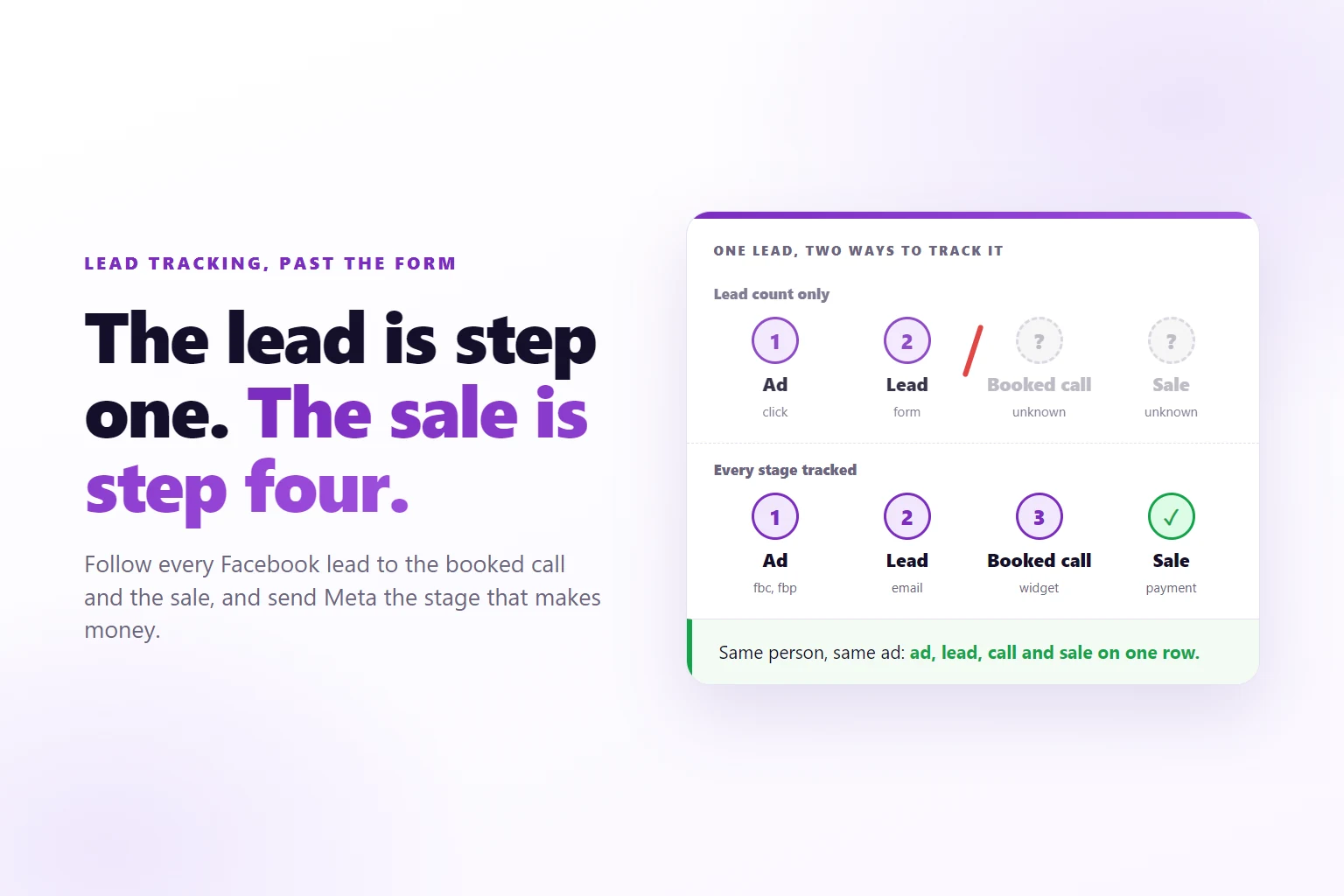
- A lead count is the first stage of the funnel, not the result.
- Every stage after the form needs its own detection: a form, a widget, a page visit, or the server for a CRM stage or a payment.
- Meta optimizes for the event you send it, so send the stage that makes money, or the earliest one that predicts it.
- The click identifier fbc, the browser identifier fbp and an email are what let a later stage be matched to a person and the ad they clicked.
- A stage that has never passed a test you ran yourself is a guess, not a tracked stage.
Tracking leads from Facebook ads means recording every step a lead takes after the click, from form to booked call to sale, tied to the ad that brought them, and reporting those steps back to Meta.
You run Facebook ads for a service business, and you want to track leads from Facebook ads all the way to the sale. Ads Manager says the campaign brought in leads at a cost you can live with. Your sales calendar says something else: most of the names never booked, some booked and did not show, and nobody can tell you which ad produced the clients who paid.
The ad platform knows about the click and the form. Your CRM knows about the call and the deal. Nothing joins them, so every decision about which ad to keep is made on the one number that does not pay the bills. This guide closes that gap.
Why counting leads is not tracking
A lead is a form someone filled in: the first stage of the funnel, and the cheapest one to fake, mistype or regret. Cost per lead tells you which ad produces form fills. It says nothing about which ad produces customers.
The obvious answer is to lower cost per lead, and it is usually the wrong one. Two ads can sit at the same cost per lead while one fills your calendar and the other fills your spam folder. Push budget toward the cheaper lead and the account looks better while the business gets worse.
Worse, Meta optimizes delivery for the event you send it. If the only event it receives is the form, it gets very good at finding people who fill in forms, which is a different group from the people who show up to a call and pay.
So tracking means following each lead past the form to the stages that make money, keeping the link to the ad the whole way, and reporting those stages back so Meta learns from them too.
What should you track after the form?
Track every step that happens to a specific person and changes the odds that you get paid. In a typical service funnel that is four stages:
- Lead. The form is sent. You have a name and an email.
- Schedule. The lead books a call on your calendar.
- Call held. The call happened. A no-show is not this stage.
- Purchase. The deal is won and paid.
Some funnels add a quiz start in front, or a checkout page opened (InitiateCheckout) in the middle. Add a stage when it changes a decision you would make. Scroll depth and video plays are behavior, not funnel stages.
Meta has standard names for most of these: Lead, Schedule, StartTrial, InitiateCheckout, Purchase, Subscribe and CompleteRegistration. Nask AI uses the same seven as its standard stages, and anything else is a custom stage with its own name, such as CallHeld. A custom stage picks which standard name it Counts in reports as, and the editor notes that it “reaches Meta under its own name, so you can optimize for it as a custom conversion.” The suggestions in Nask AI follow the order above: Lead by a form, then Schedule, CallHeld and Purchase.
Give each stage a value when you know it. A booked call is worth something before anyone pays, and every stage in Nask AI has a Value and a Predicted LTV field for it. On Purchase the value is not optional: a Purchase without one is not sent to Meta.
The four ways a stage can be detected
Every stage needs a detection: the thing that notices it happened. Every service funnel is a mix of four.
1. A form on your page. The browser sees the submit, reads the email and reports the stage. In Nask AI it is Form on a page: nsk.js, the Nask AI pixel, keeps every form with an email field or a data-nsk attribute, and reports it as Lead unless the form carries a data-nsk-stage attribute naming another stage.
2. A booking or form widget. The step happens inside a calendar or form tool embedded on your page. The widget itself has to report back. In Nask AI this is Booking or form widget, with Cal.com, Calendly, GoHighLevel, HubSpot, Jotform or Typeform as the choice. On the page, nsk.js hears a finished booking from Cal.com, Calendly and GoHighLevel and a sent HubSpot form; Jotform and Typeform report through their own webhooks.
3. A page visit. The visitor reaches a page that only exists after the step, such as /thank-you or /booked. In Nask AI this is Page visit, with a Page address contains field: when the address of the page contains your text, the stage is reported once per browser tab session. It works with any tool that can send people to a page you own.
4. The server. Some stages never touch a page: the call that was held, the deal that was won, the payment that cleared. In Nask AI the options are CRM stage (Attio), Stripe payment and Webhook, and the editor says it plainly for the last two: “Sent by the server, no page code needed.”
There is a fifth case for steps only your own code knows about, like the end of a quiz. Nask AI calls it Custom code: your page calls one line, nsk.track('QuizFinish'), at the moment the step happens.
Which identifiers let Meta match a lead to an ad?
A stage on its own is a row with a timestamp. To credit it to an ad, it has to carry something that ties it to the person who clicked. Three things do the work.
fbc, the click identifier. When someone clicks a Facebook or Instagram ad, the landing page opens with an fbclid parameter in its address. A tracker stores it in a first-party cookie called _fbc. nsk.js writes it in the shape fb.1.<timestamp>.<fbclid>, keeps it for 90 days, and replaces it when a newer click arrives. This is the strongest link between a stage and a specific ad click.
fbp, the browser identifier. The Meta pixel sets a _fbp cookie that identifies the browser. It does not say which ad was clicked, but it helps Meta recognize the same browser across visits.
An email, and a phone when you have one. The form gives you the email. It is what lets a stage that happens later, somewhere else, find the same person, because the payment and the CRM deal carry an email too. Nask AI hashes contact details with SHA-256 before anything goes to Meta.
Nask AI adds its own visitor id on top: a first-party cookie that stays with the browser, so the lead, the booking and the thank-you page visit from the same browser are known to be one visitor. nsk.js also stores the UTM parameters of the visit, utm_content included, which many advertisers fill with the ad name.
A later stage, such as a payment, is matched to a stored lead by exact email first, then by other identifiers in a fixed order: phone, a customer id, the visitor id, then names. The lead has to exist before the event, so a payment cannot borrow a click from someone who arrived after it. Anything weak or ambiguous is held with its reason, so an event never borrows a click or contact detail from a lead it cannot be sure of. In the Nask AI test panel that shows up as Match: followed by Is the lead, Matched, Held or Not matched.
The practical rule: whatever system records a later stage must keep the email the person gave on the form. A payment under someone else’s email falls back on the weaker identifiers.
Tracking booked calls from Calendly, Cal.com and HubSpot
Booked calls are the stage most service funnels get wrong. A booking widget is an embedded frame served from the scheduling tool’s own domain. A script on your page cannot read what happens inside a frame from another domain, so a pixel on your page sees someone open the calendar and nothing after that.
The fix is that the widget tells the page. Calendly’s embed sends messages to the page around it during the booking flow, including one when an event is scheduled (Calendly developer docs). Calendly’s own help page adds the catch: those events come from its JavaScript embed, and a plain iframe pasted into the page does not send them (Calendly’s advanced embed guide). Cal.com’s embed does the same, with a booking-successful event a page can listen for (Cal.com embed events).
nsk.js listens for those messages. A finished Calendly booking, a successful Cal.com booking and a completed GoHighLevel booking each arrive as Schedule. A Calendly or Cal.com booking also gets an event id built from the booking’s own id, the same way the Nask AI server side builds it, so if the same booking also arrives by webhook it counts once.
HubSpot needs care. The HubSpot option in the widget picker catches HubSpot forms, and those arrive as Lead, not Schedule. For a HubSpot meeting booking, use one of the other routes: send the booker to a thank-you page you own after the booking, if your scheduling setup offers a redirect, and catch it as a Page visit, or bring the meeting in from the server with a webhook.
Two more traps catch people here:
- A booking that was not finished. A widget reports a finished booking only. Someone who picks a slot and closes the tab is not a Schedule.
- The visitor id does not cross into the frame by itself. nsk.js adds its visitor id to Cal.com, Jotform, GoHighLevel and Typeform frames, so those tools can carry it back on their own webhooks. For other tools, the email is the bridge.
The dedicated guides on tracking Calendly bookings and HubSpot meetings tracking go deeper into each tool.
Tracking the call that happened and the sale
The last two stages happen away from your site, so no pixel can see them. They come from the systems that record them.
The call held. Your sales team marks it somewhere, usually by moving a deal to a stage in the CRM. That move is the event. In Nask AI, pick CRM stage (Attio) and type the Attio stage title exactly as Attio shows it, for example “Call held”. Attio sends list entry changes to a webhook (Attio webhook docs), and the editor notes that “Attio changes arrive as offline stages, accepted up to 62 days after the click.” For a different CRM, pick Webhook and have the CRM post the stage when a deal moves.
The no-show is why this stage matters: a booked call that never happens looks like a good lead until someone records it.
The sale. If you are paid through Stripe, the payment is the cleanest signal you will ever get: Stripe sends an event to an endpoint you register when a payment succeeds (Stripe’s webhook documentation), with the payer’s email on it. In Nask AI that is the Stripe payment detection, and Purchase and Subscribe start on it by default. A sale recorded somewhere else comes in by Webhook.
Refunds and cancellations are worth recording too, but they adjust your reports; Nask AI never sends Cancel or Refund to Meta.
Now the choice the whole setup exists for: which stage to send to Meta as the one to optimize for. The answer is the deepest stage that still happens often enough for Meta to learn from. A sale is the truth, but if it happens only a handful of times a week, Meta has little to work with. A booked call happens more often and still predicts revenue, so many service businesses optimize for Schedule or CallHeld and report on Purchase.
In Nask AI every stage has a Send to Meta switch, on by default, so you choose which stages Meta sees. The other stages still show up in your own reports.
How do you check that each stage is caught?
Complete the step yourself and watch it arrive. Use an email address you own and go through the step the way a lead would: send the form, book a real slot, reach the thank-you page. Then check two things: the stage arrived under the right name, and it carried the identifiers that make it matchable.
In Nask AI, every stage caught on the page has a Test button. Click Test this stage, then Open the test page, and do the step. The panel shows Pixel seen on the page, then each event it catches with flags for Visitor id, fbc, fbp, utm_content and Email, and Detected once the stage itself arrives. After 90 seconds without it, the panel says Not detected and offers Send to Nask AI support. While the brand’s Sending to Meta card is on Dry run, a test event reads “Test mode, not sent to Meta”. The Nask AI pixel setup guide walks through every line of that panel.
An fbc flag of “no” during a test is normal when you opened the page directly: there was no ad click, so there is no fbclid to store.
For server stages there is nothing on the page to test. Move a test record through the CRM stage, or check the first real payment, and confirm it arrived and matched before you trust the number. Meta’s Test Events view in Events Manager is the same check from Meta’s side.
Retest whenever the chain changes: a new landing page, form tool or calendar link. That is when a stage breaks without telling anyone, and the guide to a pixel that stops firing covers what to check first.
When a CRM sync is enough, and when it is not
Plenty of tools sell a sync: the lead goes from the ad form into your CRM or a spreadsheet, and someone calls it. For some businesses that is all you need.
A sync is enough when:
- Your leads come from instant forms only, so there is no page of your own to track.
- You need the lead in front of a salesperson fast, and that is the whole job.
- You are not trying to optimize Meta on anything past the lead, and you do not need to know which ad produced a sale.
A sync is not enough for anything past that. It does not carry the click and browser identifiers along with the later stages, and it does not report the booked call, the call held or the sale back to Meta. So Meta keeps optimizing for form fills, and your ad report keeps ending at the lead.
You need the full chain when leads land on your own site, when the ad you keep depends on who paid, or when you want Meta to optimize for booked calls. Once it does, the next question is how many ads each ad set needs.
One more thing belongs in the decision: the identifiers in this guide are personal data. An email and a cookie id tied to a person fall under rules like the EU data protection rules when your visitors are in the EU. Say in your privacy notice what you collect and where it goes, and ask for consent where the law requires it.
Raising lead quality starts here, too. You cannot fix lead quality you cannot see, and the call held is the first stage that shows it.
Frequently Asked Questions
Can I see which ad produced a sale, not only a lead?
Yes, if every stage after the form carries the same visitor identifiers as the lead. A tracker that stores the click identifier fbc, the browser identifier fbp and the email from the form can tie a later booking or payment to the same person and the ad they clicked. Without those identifiers the sale exists in your CRM but not in your ad data.
Do I need a CRM to track leads from Facebook ads?
No. Forms, booking widgets and thank-you page visits can be caught on your own site with a pixel. A CRM becomes necessary for stages that happen off the site, such as a call being held or a deal being won. In Nask AI those stages arrive through a CRM stage, a Stripe payment or a webhook.
Why do my Facebook lead numbers not match my CRM?
Because they count different things at different times. Meta counts a lead when its event fires and applies its own attribution, while a CRM counts a record when it is created, usually deduplicated by email. Instant forms add leads Meta sees and your site never does. Decide which number is the truth, usually the CRM, and send its stages back to Meta.
Is a pixel on my page enough to track booked calls?
Often not. Booking widgets run inside an embedded frame from another domain, so a script on your page does not see the booking unless the widget reports it or the visitor lands on a page you control. That is why booked-call tracking is usually the first thing broken in a service funnel, and why it needs its own test.
How long until tracking data is useful for optimization?
As soon as each stage fires reliably, but Meta needs steady volume before it can optimize on a later stage. A stage that happens a handful of times a week gives it little to learn from, so many service businesses optimize on the earliest stage that still predicts revenue, such as a booked call, and report on the sale.
Track your funnel in Nask AI
Nask AI holds the whole chain in one place. nsk.js catches the stages on your pages, Attio, Stripe and webhooks bring in the ones off them, each stage is matched back to the lead and the ad, and you choose which stages go to Meta through the Conversions API. The Conversions API setup for lead funnels covers the sending side.
Map your funnel, put nsk.js on your pages, and test the first stage today. Then send Meta the stage that makes you money.
Book a demo