 Nask AI
Key takeaways
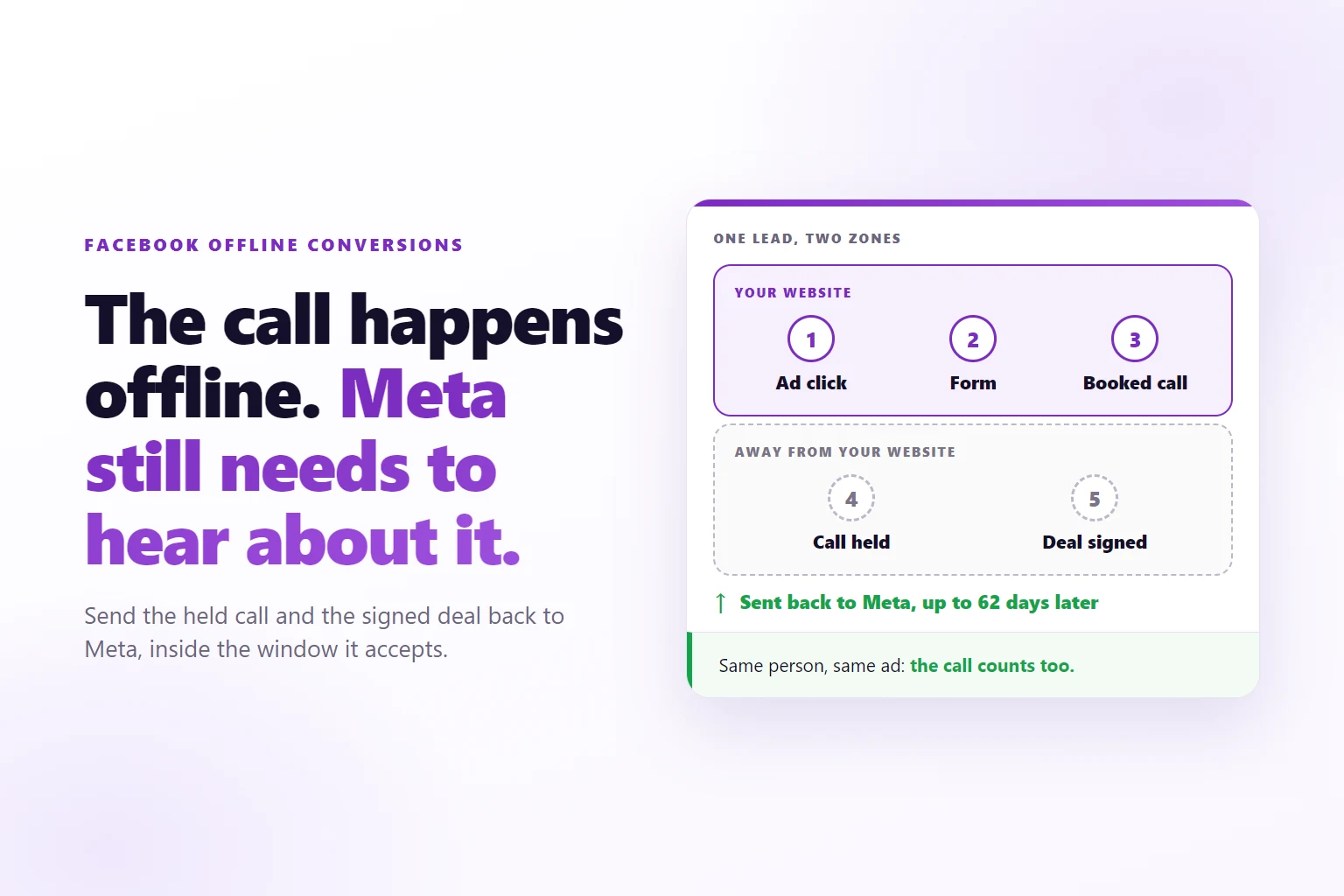
- An offline conversion is a stage that happens away from your website, such as a call held or a deal signed, reported to Meta after it happens.
- Meta’s separate offline upload is gone: offline events now travel the Conversions API, tagged with where they happened.
- An offline event can be sent while it is under 62 days old. Other server events must be under 7 days old.
- An offline event with only an email can still be matched to the ad, if the lead with the click identifiers was stored first.
- Send the deepest stage that still happens often enough for Meta to learn from, and check that it arrived before you trust it.
A Facebook offline conversion is a customer action that happens away from your website, such as a held call or a signed deal, sent to Meta after the fact so it can be credited to the ad that started the journey.
You sell through calls. The ad brings a form, the form brings a booking, and then everything that matters happens somewhere your website cannot see: the call, the follow-up, the signature. If you want Facebook offline conversions to work for you, the question is how those later moments get back to Meta, and how late is too late.
Ads Manager still shows the lead, because the form lives on your page. The held call and the signed deal live in your CRM, so Meta never hears about them. It keeps optimizing for the people who fill in forms, and some of those people never pick up the phone. This guide covers what an offline conversion is for a booked call, how it reaches Meta now, the two time windows, and how to prove it arrived.
What counts as a Facebook offline conversion for a booked call?
A stage counts as offline when it happens away from your website and the browser pixel cannot see it. Look at where each stage of a call funnel actually happens:
- The ad click and the form. Both happen on your page. The pixel sees them.
- The booking. It happens in a calendar widget embedded on your page. A widget can report back to the page, so this stage is often caught on the site, but only if the widget cooperates.
- The call held. It happens on a phone or video call. The only record is your CRM, once someone moves the deal to a stage.
- The deal signed. It happens in a contract tool, an invoice or a payment. Again the record is in another system.
Stages 3 and 4 are the offline ones, and they are the ones that make money. A booked call that never happens looks like a good lead until somebody records the no-show. The guide to tracking leads from Facebook ads to sales covers the four ways a stage can be detected, including the server routes these two use.
Offline does not mean the person was in a shop. It is Meta’s word for an action that took place away from your site or app, and what matters is that the stage reaches Meta with enough detail to be credited to an ad.
What happened to Meta’s offline event sets?
Meta has retired the separate Offline Conversions API and its offline event sets. Offline events now go through the same Conversions API as every other server event, attached to a dataset, the place in Meta where your events are collected. An older offline event set ID is replaced by a dataset ID, so a tutorial that tells you to create an event set and upload a file describes a route that no longer exists. What survives is the idea: tell Meta about a customer action that happened away from your site, with enough detail to match it to a person.
Outside sources agree on the change and differ on the details. One describes the standalone endpoint as discontinued in May 2025, and another points to a Graph API version change. Segment’s documentation for its old offline destination says the destination “no longer accepts data” and points to the Conversions API instead (Segment documentation for the Facebook Offline Conversions destination). A vendor guide gives the same picture: offline events “now flow through the standard Conversions API (CAPI) attached to a Dataset” (CustomerLabs guide to Meta offline conversions). For the exact version and date, check Meta’s current documentation.
The practical result is that nothing separate is left to set up for offline conversions. If a tutorial tells you to create an offline event set and upload a file, it describes a route that no longer exists.
How does an offline event reach Meta now?
It arrives as a server event with four parts that matter for a call funnel.
- An event name. A standard one such as Schedule or Purchase, or your own, such as CallHeld. A custom name reaches Meta as itself, so you can optimize for it as a custom conversion.
- An event time. The moment the stage happened, not the moment you sent it. If the deal moved to “Call held” on Tuesday, Tuesday is the time, even if the event is sent on Thursday.
- An action source. A field that tells Meta where the action happened. Nask AI marks CRM stages from Attio as offline, using the value
physical_store. That value is named for shops, but it is the one that earns the longer window described below, so offline stages carry it. - Customer information. Hashed contact details such as email and phone, plus the click and browser identifiers when you have them. Hashing means the email is scrambled with SHA-256 before it leaves your side, so Meta can compare it with its own records without receiving the plain text.
A browser event and a server event for the same action are usually sent together and deduplicated. An offline stage has no browser twin, since nothing happened in a browser, so there is nothing to deduplicate against. What still matters is that the same stage is not sent twice. In Nask AI each event is claimed before it is sent, so a repeated delivery from your CRM never reaches Meta twice.
How long can you wait: 7 days or 62?
It depends on the action source. In Nask AI, a server event from a page or from a system is sent only while it is under 7 days old. An offline stage is sent while it is under 62 days old. Anything older is stored and shown in your reports but not sent, because Meta would refuse it.
The Nask AI stage editor says it in one line under the CRM option: “Attio changes arrive as offline stages, accepted up to 62 days after the click.” The 62 days count from when the stage happened, not from the click. A call held 20 days after the ad click is fine, and so is a signature recorded as an Attio stage on day 55. A stage that happened 70 days ago is too old whichever way you count.
A sale detected through Stripe keeps the 7 day window; only Attio stages and webhook stages sent as offline get 62 days. That split is why the stage you pick to detect a sale matters as much as the stage you name: a sale that your team records in Attio can arrive late, while a Stripe payment is expected to arrive within hours of the moment it clears.
Three habits keep stages inside the window:
- Move deals the day things happen. The time Meta sees is the time of the move. A call held on the 3rd but moved to “Call held” on the 28th reaches Meta as the 28th, and the delay shifts the credit to the wrong day.
- Do not backfill old deals in bulk. A batch of deals closed months ago will mostly miss the 62 days and teach Meta nothing.
- Do not send an offline stage as a normal website event. At 7 days or more it is refused. The action source is what keeps it alive.
How does a call held find the ad?
A stage from your CRM carries a name and an email. It does not carry the click. The click identifier lives with the lead that was stored when the form was sent, so the offline stage has to be matched back to that lead.
Nask AI does the match in a fixed order: exact email first, then the same email written differently, then phone, then a customer id, then the visitor id, then names. One rule keeps it honest: the lead has to be older than the event, so a stage can never borrow a click from someone who arrived after it. When the match is certain, the offline stage inherits the lead’s click identifier (fbc, the click ID from the ad link) and browser identifier (fbp, the cookie the Meta pixel sets), and your reports credit the ad from the lead’s UTM parameters.
When there is no lead, or two leads fit, the event is still sent with its own data only. Nothing is borrowed, so it can never be credited to the wrong person. An event with nothing Meta can match on, with no email, no phone and no identifier, stays home. In the Last 30 days activity card that shows up as Matched, Held or No lead.
The practical rule is the one from lead tracking, and it matters more here: whatever records the later stage must hold the email the person gave on the form. A call booked with a personal email and logged in the CRM under a work email is two people to a matcher.
Which offline stage should you send to Meta?
Send the deepest stage that still happens often enough for Meta to learn from. In a call funnel there are three candidates:
- Booked call. It happens most often and predicts revenue. It is often caught on the page, so it is not even offline. This is the usual choice for a service business with low volume.
- Call held. It filters out the no-shows. It is a custom stage in most CRMs, which is why Nask AI suggests the name CallHeld and the order Lead, Schedule, CallHeld, Purchase.
- Deal signed. It is the truth about revenue, but if it happens only a handful of times a week it gives Meta little to learn from.
You do not have to pick only one. In Nask AI every stage has a Send to Meta switch, so you choose which ones Meta sees. The others still appear in your own reports, which is where you judge the whole funnel. A value helps Meta weigh the stage. Give a held call a Value when you know roughly what one is worth, and note that a Purchase without a value is not sent. The steps for sending CRM stages back to Meta run from picking stages to a dry run.
How do you set up an offline stage in Nask AI?
Nask AI connects your Attio workspace to the brand for you first; there is no connect button in the stage editor yet. After that, add a stage in 2. Funnels and stages, pick CRM stage (Attio) under Detected by, and type the Attio stage title exactly as Attio shows it, for example “Call held”. Nask AI receives Attio’s stage changes through a webhook, a message Attio posts whenever a record changes (Attio’s webhook documentation), and a stage whose title is not mapped is ignored. The click path for every field is in the guide to sending CRM stages back to Meta.
If your CRM is not Attio, pick Webhook as the detection and have your CRM post the stage when a deal moves. That route is a server stage too, but whether it gets the 62 days depends on the action source your CRM sends. Nask AI’s ingest accepts offline as that value and treats it as physical_store. The public ingest guide still lists 7 days; the offline value is accepted by the endpoint but not documented there yet, so test with one event. A stage sent without it gets the 7 day window, so set it for any CRM stage that may arrive late.
How do you check an offline conversion arrived?
Move one test deal into the stage with a test email you own that matches a test lead. In the Last 30 days activity card, the event lands under Matched, not Held or No lead. While the brand’s Sending to Meta card shows Dry run, nothing is sent; going live sends new conversions only, so nothing old is replayed. Once live, Meta’s Test Events view shows whether the event arrived under the name you chose. Meta decides what it credits; the view only tells you it was received.
Repeat the check whenever the chain changes. A renamed CRM stage fails quietly, because the old title no longer matches anything.
When offline conversions will not help
Offline conversions are not worth the setup in three cases.
- Your volume is too low. A signed deal that happens twice a month is a fact for your books, not a signal Meta can learn from. Send the booked call, report on the deal.
- Your CRM is not kept up. Stages moved weeks late arrive late, miss the window, or credit the wrong day. A tidy CRM is the real prerequisite.
- You have no stored lead. If people reach your CRM from a phone call or a message with no form, there is no click identifier to inherit. The event can still be sent with an email, but it will rarely be tied to an ad.
Also check the legal side. An email and a click identifier tied to a person are personal data under rules like the EU data protection rules when your visitors are in the EU. Say in your privacy notice what you collect and where it goes, and ask for consent where the law requires it.
The Nask AI pixel setup guide shows the page side of the same setup, so the lead is stored before any offline stage arrives.
Frequently Asked Questions
What is an offline conversion on Facebook?
An offline conversion is a customer action that happens away from your website or app, such as a phone call, a meeting held or a contract signed, reported to Meta after the fact. It is sent as a normal server event with an action source that says where it happened, and Meta uses it to credit the ad that started the journey.
Does Meta still accept offline event set uploads?
No. Meta has retired the separate Offline Conversions API and its offline event sets, and offline events now go through the regular Conversions API into a dataset. Outside sources differ on the exact version and date, so check Meta’s current documentation before you plan a migration.
How long after the call can I send an offline conversion?
An offline event can be sent while it is under 62 days old, against under 7 days for other server events. The clock runs from the time the stage happened, not from the day you send it. Past the limit Meta refuses the event, so a stage logged weeks late in your CRM may be too old to send.
Do I need the lead’s email to send a held call?
You need at least one identifier, and the form email is the best one, because Meta can only credit an event it can match to a person. The cleanest route is to keep the email the person gave on the form, so the later stage can be matched back to that lead and the ad click stored with it.
Should I send the booked call or the signed deal?
Send the deepest stage that still happens often enough for Meta to learn from. A signed deal is the truth, but if it happens a few times a week it gives Meta little to optimize on. A booked call or a held call happens more often and still predicts revenue, so many service businesses send those and report on the deal.
Send your booked calls back with Nask AI
Nask AI catches the form and the booking on your pages with nsk.js, the Nask AI pixel, brings in the call held from Attio and the sale from Stripe or a webhook, matches each stage to the lead and the ad, and sends the stages you choose to Meta through the Conversions API, offline ones included.
Map your funnel, name the stage your CRM already has, and test it with one real deal. Then send Meta the call that makes you money.
Book a demo