 Nask AI
Key takeaways
- The booking happens inside an embedded frame your page script cannot read.
- The widget reports bookings to the parent page, and a tracker can listen for them.
- A redirect to your own thank-you page is the fallback that rarely breaks.
- Cal.com works the same way; HubSpot meetings need the redirect or a webhook.
- A booking is tracked only once you have booked a real slot through your own ad link and watched it arrive.
Tracking Calendly bookings from Facebook ads means recording each scheduled call as a funnel event tied to the visitor who clicked the ad, even though the booking happens inside Calendly’s embedded widget rather than on your page.
You send Facebook ads to a landing page with a Calendly calendar on it. People book calls. You can see them in your calendar every morning. Then you open Ads Manager and the booking count is zero, or a third of what you know is real, and nobody can tell you which ad filled the calendar.
Nothing is broken on the calendar side. The Facebook pixel on your page cannot see inside Calendly’s embedded widget, so the booking happened somewhere your tracking cannot reach. This guide explains why, and gives you three ways to catch the booking and send it to Meta. If you want the whole path past the form first, read the full lead tracking method. This one goes deep on the booking step alone.
Why your pixel misses Calendly bookings
Your Meta pixel is a script on your page. It sees what happens on your page: the page loads, a form is submitted, a button is clicked. A Calendly calendar embedded on that page is not part of your page in the way that matters. It is a frame, a separate document loaded from Calendly’s own domain and displayed in a window inside yours.
Browsers keep the two apart on purpose. A script on your page cannot read what is inside a frame from another domain, and the frame cannot read your page. That rule protects visitors, and it is why your pixel sees someone open the calendar and then nothing at all. The slot gets picked, the confirmation appears, the booking exists in Calendly, and your page never learns about it.
That gap shows up in three ways, and it helps to know which one you have:
- The event never fires. Nothing on your page listens for the booking, so no event is created.
- The event fires without identifiers. Something records a booking, but it carries no click identifier or email, so Meta counts it and cannot tie it to an ad.
- The event fires twice. A widget event and a thank-you page visit both report the same booking, and the count is inflated.
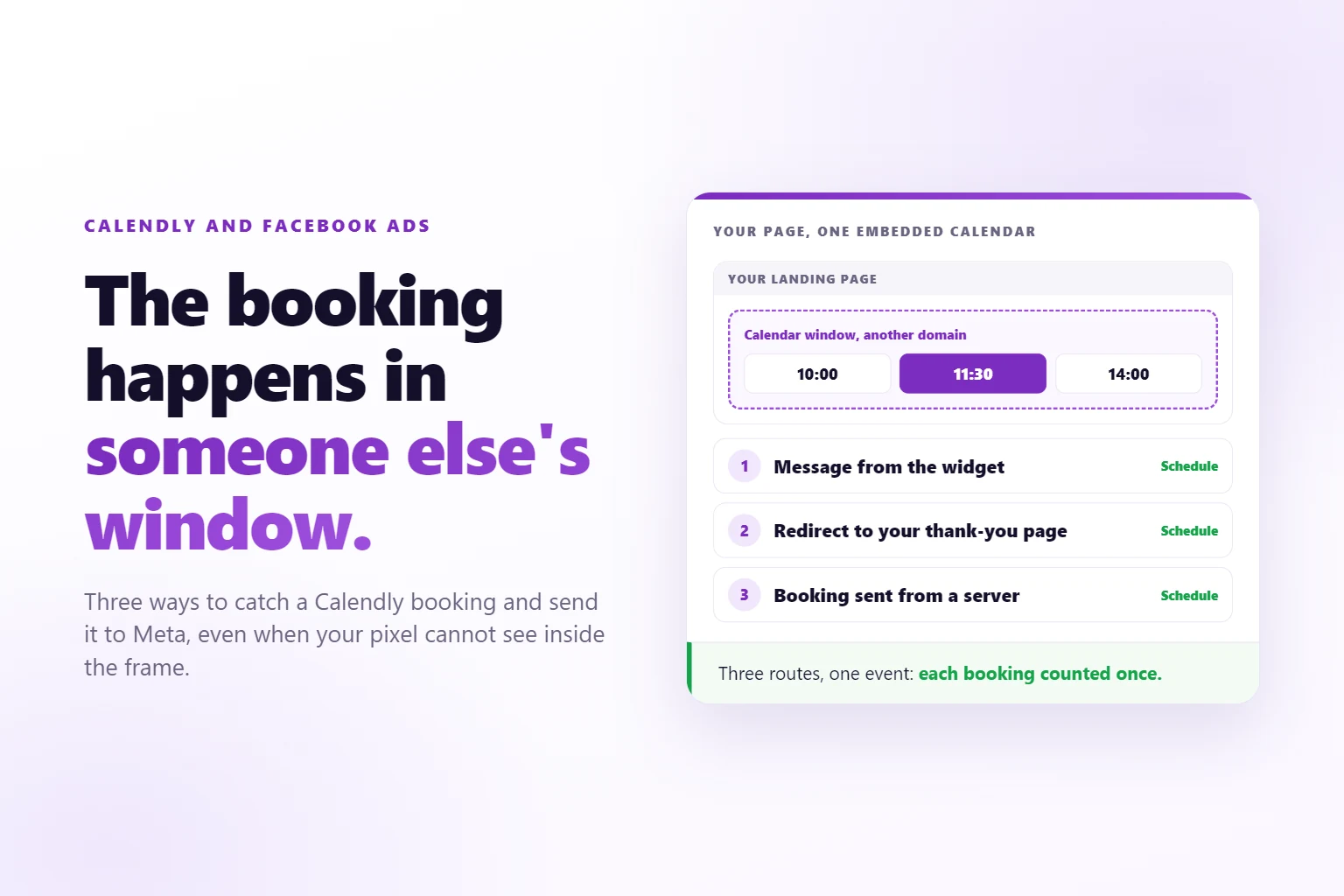
The three methods below fix each of these. Pick one, or combine two.
How does an embedded booking widget report a booking?
The widget cannot be read from outside, but it can speak. Browsers have a built-in way for a frame to send a message to the page around it, called postMessage (MDN’s reference). The frame posts a small object, and any script on the parent page can listen for it.
Calendly uses this. Its embed posts messages to the parent window as the visitor moves through the booking, and its developer documentation lists them: the profile page viewed, the event type viewed, a date and time selected, and the one you want, calendly.event_scheduled, which fires when the booking is complete (Calendly’s notifying-the-parent-window page). The scheduled event carries the address of the event and of the invitee, which is the booking’s own identifier.
Two details decide whether this works for you:
- The message only comes from Calendly’s JavaScript embed options. Calendly’s help page for developers says a plain iframe pasted into a page does not send these events (Calendly’s advanced embed guide). If your page uses a bare iframe, switch to the inline, popup or floating embed from Calendly’s embed settings before anything below can work.
- The message is only a signal. It says a booking finished. It does not carry the ad the visitor clicked. Your page has to attach that, which is what the identifiers in the next section are for.
Method one: listen for the widget’s booking event
The first method is to listen for the message and turn it into a Meta event. The listener checks who sent the message, checks it is the booking event, and fires a Schedule event with an event id built from the booking.
window.addEventListener("message", (e) => {
  if (e.origin !== "https://calendly.com") return;
  if (!e.data || e.data.event !== "calendly.event_scheduled") return;
  if (!window.fbq) return;
  const invitee = e.data.payload.invitee.uri;
  const id = "calendly_" + invitee.split("/").pop();
  fbq("track", "Schedule", {}, { eventID: id });
});
Three parts of that snippet matter:
- The origin check. Any frame can post a message to your page, so the listener accepts messages from Calendly’s domain only.
- The event name.
Scheduleis one of the standard events Meta already knows, and it is the natural name for a booked call. - The event id. The booking’s own identifier makes the id stable. If the same booking is reported a second time by another route, the matching id lets Meta count it once.
That snippet reports the booking from the browser, and it is only as good as the identifiers the browser event carries. A bare Schedule call from the page rides on the pixel’s own cookies, which is fine when the pixel is loaded, and weak when it is blocked. A tracker that also stores the click identifier and the email from the form can attach them to the booking and send it from the server too.
In Nask AI you do not write the listener. The nsk.js pixel already has one. Open a funnel stage, set Detected by to Booking or form widget, choose Calendly under Widget, and nsk.js hears the finished booking and reports it as Schedule. It builds the id from the same booking id, combined with your brand id the way the server route does, so a copy that arrives from the server counts once. Use the snippet instead of nsk.js, not with it: Nask AI’s server copy uses a different id, so running both would count the booking twice. It also stores the click identifier and visitor id from the visit, so the booking is tied to the person and the ad. The Nask AI pixel setup guide walks through creating that stage.
Know where method one is weak. It depends on the widget’s messages, and on the visitor staying on the page until the message fires. If the tool changes its message, or a script blocker stops your listener, nothing is reported. Method two covers that. Other causes are covered in fixes for a pixel that stops firing.
Method two: redirect to your own thank-you page
The second method does not read the widget at all. It sends the visitor somewhere you control after the booking, and counts that visit.
Calendly has a setting for this on the event type, on its paid plans: after a booking, send the invitee to an external page instead of the default confirmation. Check where it sits on your plan, because the available settings change. Point it at a page on your own domain, such as /booked, and make sure that page only exists for people who booked.
Then count the visit. A page visit on your own domain is the most reliable event there is: your script runs on your page, it can read the click identifier it stored earlier, and nothing crosses a frame. In Nask AI that is a Page visit detection with Page address contains set to /booked. When the address contains that text, the stage is reported once per browser tab session.
The cost is on the visitor’s side. They leave the calendar for another page, and the default Calendly confirmation, with its calendar buttons, is gone. Fix that by putting the details on your thank-you page: the day, the time and what to prepare.
Two traps catch people here:
- The page is reachable without a booking. If anyone can open
/booked, a visit stops meaning a booking. Keep the address out of your navigation and out of search results. - A refresh counts again. Counting once per tab session handles a refresh. A visitor who reopens the page from an email days later is a new session. Keep the address out of the confirmation email, or accept a few repeats.
If you use both methods, deduplication matters. Nask AI keeps the ids it has sent in the tab for ten minutes. A thank-you visit reported by a later page is skipped when the widget event was already sent for the same stage. So the booking counts once, and you get the redirect as a fallback.
Method three: send the booking from a server
The third method skips the browser. The booking tool calls a web address of yours when a booking is created, and that call is the event. A browser extension, a script blocker or a closed tab cannot stop it, because the browser is not involved.
In Nask AI this is the Webhook detection, and the editor says “Sent by the server, no page code needed.” Events go to the brand’s Conversions API endpoint: open the brand, go to Growth, then Conversions API, and click Create secret. Each event carries an event_id, an event_name of Schedule, and an occurred_at time. Calendly’s own webhook sends a fixed payload and cannot add your secret as a header, so put a Zapier or Make step between them: it watches for new Calendly bookings and posts to that endpoint with the header and a JSON body. Calendly webhooks need a paid Calendly plan, so check yours.
Three details keep a server booking honest:
- Use the booking’s id as the event id. Make it
calendly_followed by the last part of the invitee address, the same convention the page listener uses. A retry or a duplicate is then stored once. - Set the time to when the booking was made. The
occurred_atfield is when the visitor booked, not when the call takes place. A call booked today for next week is still today’s conversion. - Send the email. The email from the booking is how the server event finds the lead you already stored, along with the click identifier and the ad that came with them.
The server route has one limit. It only knows what the booking tool knows: an email, a name, a time. It does not see the browser, so it cannot add the click identifier by itself. The match back to the lead is by email, which is why the email on the booking must be the one the visitor used on your form. A booking under a different address falls back on weaker identifiers.
What about Cal.com and HubSpot meetings?
The same three methods apply, with different details.
Cal.com. Its embed emits events a page can listen for. You subscribe with Cal("on", ...) and the action bookingSuccessfulV2, which replaces the older bookingSuccessful (Cal.com’s embed events guide). The payload includes the booking’s uid. The Cal.com help page notes the booking may not be confirmed yet when the event fires, which matters if you require approval for bookings. nsk.js listens for the successful booking and builds its event id from that uid. For the server route, Nask AI has a Cal.com webhook adapter of its own: a created booking becomes a Schedule, a reschedule lands as a duplicate of the original, and a cancellation is acknowledged and stores nothing.
HubSpot meetings. Treat these with care. A HubSpot meeting link is a scheduling page, not a form, and nsk.js does not listen for a HubSpot meeting booking. The HubSpot option in the widget picker catches HubSpot forms, which arrive as Lead. For a meeting, use the redirect: HubSpot’s scheduling page settings include a redirect option (HubSpot’s scheduling pages guide), though it needs an assigned Sales or Service seat, so verify it in your own account. If it is not offered, use a webhook from a HubSpot workflow, or bring the meeting in from the server.
Whichever tool you use, the order of preference is the same. Use the widget message when the tool sends one and you stay on the page. Add the redirect as the fallback that rarely breaks. Add the server route when the booking must count even if the browser fails. Two of the three, deduplicated, is the setup most booked-call funnels end up with.
How do you know the booking reached Meta?
Book a real slot yourself. Use an email address you own, open your landing page through a link that carries a click identifier, and go through the calendar the way a lead would. Then check two things: the event arrived under the right name, and it carried the identifiers.
In Nask AI, every stage caught on the page has a Test button. Click Test this stage, then Open the test page, and complete the booking. The panel shows Pixel seen on the page, then each event it catches with flags for Visitor id, fbc, fbp, utm_content and Email, and Detected once the booking itself arrives. If nothing arrives within 90 seconds, the panel says Not detected and offers Send to Nask AI support. While the brand’s Sending to Meta card is on Dry run, a test event reads “Test mode, not sent to Meta”. Switch the card to live when the test passes.
A few results to expect:
- The fbc flag reads no. That is normal when you opened the page directly. There was no ad click, so there is no click identifier to store.
- The event arrives but not as Schedule. The stage is detecting something else on the page, often a form. Check the widget and page address fields.
- Nothing arrives, and the calendar is a bare iframe. Switch to Calendly’s JavaScript embed, or use the redirect.
Server stages have no Test button. Create a test booking, then open the brand’s Growth tab, then Conversions API, and check the activity card: it shows whether the event was Matched, Held or had No lead. Meta’s own Test Events view shows the same event from Meta’s side.
Retest whenever the chain changes: a new landing page, a new calendar link, a changed event type. That is when a booking stops being caught without telling anyone.
When to track the call held instead of the booking
A booking is not a call. People book and do not show, or book to see whether you reply, and a funnel full of bookings can still be a funnel with an empty calendar by Thursday. Meta optimizes for the event you send, so a Schedule event teaches it to find people who book, not people who turn up.
That is fine at the start. A booking is closer to revenue than a form fill, it happens often enough for Meta to learn from, and it arrives within minutes of the click. Once you have steady bookings, look at the show rate. If a large share of bookings never happen, the better stage to send is the call held, because it only fires for people who showed up.
The call held happens off your site, so the booking widget cannot report it. In Nask AI, it comes from a CRM stage (Attio) or a Webhook when someone moves the deal to the stage you named. The tradeoff is volume: fewer events, later in time. If the call held happens only a handful of times a week, Meta has little to learn from. Many service businesses send both, optimize on the booking, and read the call held in their own reports. Once bookings are flowing, how many ads each ad set needs decides how much variety Meta has to work with.
Last, the identifiers in all of this are personal data. If your visitors are in the EU, the EU data protection rules apply, so say in your privacy notice what you collect and where it goes.
Frequently Asked Questions
Does Calendly have a built-in Meta pixel integration?
Yes, on paid plans. Calendly’s help center describes a Meta Pixel integration for Owners and Admins on its Standard, Professional, Teams and Enterprise plans, and it includes a booked-meeting event. Whatever you use, test it: book a call through your own ad link and confirm the event arrives at Meta with the click identifier attached. A booking event without identifiers is counted but rarely matched to the ad.
Why does my Calendly booking not show in Ads Manager?
Usually because the booking happened inside the embedded widget, on Calendly’s domain, where the pixel on your page cannot see it. Either nothing listened for the widget’s booking message, or the event fired without the identifiers Meta needs to match it. Check whether the event arrived first, then check which identifiers it carried.
Is a thank-you page redirect better than widget events?
It is more reliable and slightly worse for the visitor. A redirect fires a page visit you fully control on your own domain, so it rarely breaks. Widget events keep the visitor on the page but depend on the widget’s messages. Many funnels use both, with deduplication so each booking is counted once.
Does this work for Cal.com and HubSpot meetings?
For Cal.com, yes. For HubSpot meetings, use the redirect or a webhook, because nsk.js does not hear a HubSpot meeting booking. Cal.com and Calendly both send a booking message to the page, and all three tools can redirect or send a server event. Test each tool the same way.
Should I optimize my ads for bookings?
For most service businesses, yes, once bookings happen often enough each week for Meta to learn from them. A booking is closer to revenue than a form fill, so Meta looks for people who book. If bookings are rare, optimize for the lead and send bookings anyway, so the data is ready when volume grows.
Track bookings as a stage in Nask AI
Nask AI treats a booking as a funnel stage. nsk.js hears the finished booking from Calendly or Cal.com, a Page visit catches the thank-you page, and a Webhook brings in the ones your browser never sees. Each booking is matched back to the lead and the ad, and the Send to Meta switch decides which stages Meta receives.
Book a demo and we will add your booking as a stage, book a real slot through your ad link and watch it arrive.
Book a demo